Multi-Factor Authentication: The 11-Minute Fix That Stops Most Hacks

This week's tip is the one I give every business owner I meet, because it does more for less effort than anything else in cyber security. It's not glamorous. It's not new. And it works.
The Sunday morning that nearly cost a tax season
A different Greater Manchester accountancy practice from the one in last month's voice-clone column rang me on a Sunday morning. The senior partner — let's call him David — couldn't get into his Microsoft 365 inbox. Three thousand miles away, someone else could.
The attacker had bought David's email and password from a credential dump on the dark web — leaked years earlier from a hobby forum he'd long forgotten — and tried it against Microsoft 365 on a hunch. It worked first time. Within forty minutes they'd sent a wave of fake invoices to twenty of David's clients, set up an inbox rule to hide the replies, and quietly waited.
We caught it because two clients rang the office on Monday morning saying "weird invoice from David". By then a £6,800 payment was already in motion.
The kicker: turning multi-factor authentication on would have stopped the attacker at the front door. The leaked password would have been useless without the code on David's phone. The whole thing — every minute of panic, every awkward client call — was prevented by something that takes eleven minutes per person to set up.
Worth saying plainly: David's firm wasn't one of ours either. If they had been, MFA would have been switched on from day one as part of the M365 baseline — and that Sunday morning phone call would never have happened.
Why this matters
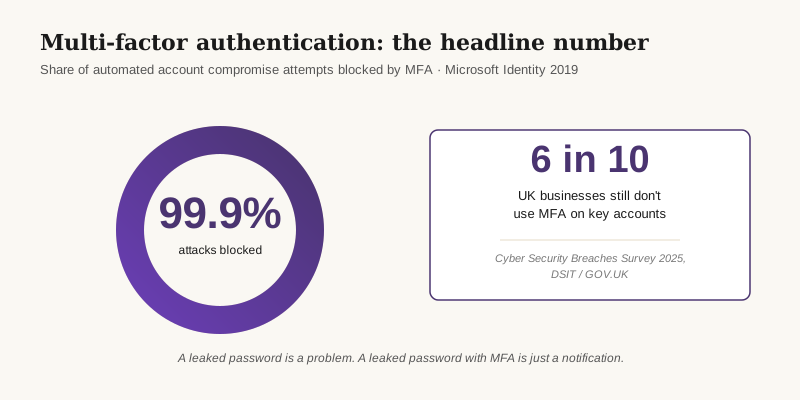
- MFA blocks 99.9% of automated account compromise attacks. Microsoft's identity team published this figure based on the billions of sign-ins across their cloud — and it has held up every year since. Microsoft Security blog, 2019.
- Six in ten UK businesses still don't use it on their key accounts. Only around 40% of UK businesses report using two-factor authentication on cloud services. Cyber Security Breaches Survey 2025, GOV.UK.
- The UK's National Cyber Security Centre is unambiguous: MFA should be on every business-critical account, and authenticator apps are preferred over SMS. NCSC: MFA for your corporate online services.
The fix
The fix is to install an authenticator app — Microsoft Authenticator or Google Authenticator — and turn MFA on for your most important accounts. We bundle this with Conditional Access policies, Cyber Essentials alignment and a clear rollout plan as part of our Secure State offering, so nobody gets locked out and everyone knows what to expect.
Three things you can do this week
🏠 At home
Install Microsoft Authenticator or Google Authenticator on your phone tonight. Open your personal email and your online banking, find the security settings, and switch on two-step verification. Scan the QR code with the app. That's it — about four minutes per account, and it's a one-time job. Combine this with the password manager habit from two weeks ago and you've covered the two biggest risks in your digital life.
🏢 At work
In the Microsoft 365 admin centre, turn on security defaults — or, for tighter control, a Conditional Access policy that requires MFA for all users. Pair it with number matching to defeat MFA-fatigue attacks. We deploy this as part of our Secure State offering, alongside managed IT support, payment approval workflows and the staff training that turns "why is it asking me again?" into muscle memory.
🌍 For everyone
Don't try to MFA-protect everything at once. Pick the three accounts that would hurt most if stolen — usually email, banking and your password manager — and put MFA on those today. Print or save the backup codes somewhere safe. Everything else can wait until next week. Progress, not perfection.
Which kind of MFA should you use?
Honest comparison — we've rolled all four out for different clients.
| Method | How it works | Cost | Recommended? |
|---|---|---|---|
| Authenticator app | A free app on your phone generates a six-digit code or push prompt | Free | ✅ Yes — best balance of safety and ease |
| Hardware security key | A small USB or NFC key (YubiKey, Feitian) you tap to confirm | £25–£60 per user | ✅ Yes — gold standard for admins and finance teams |
| SMS text code | A code is texted to your mobile number | Free | ⚠️ Better than nothing — vulnerable to SIM-swap |
| Email code | A code is emailed to the same address you're securing | Free | ❌ No — defeats the point if email is compromised |
What this looks like locally
We've rolled MFA out for accountancy practices in Stockport, law firms in Altrincham, dental groups in Oldham and not-for-profits across Tameside. The pattern is always the same: a short evening session to enrol the team, a one-page "what to expect" note, and a quick check the following week to make sure nobody's been locked out. By the end of the second week, nobody remembers what it was like without it.
If you're working towards Cyber Essentials or Cyber Essentials Plus, MFA is a hard requirement of the scheme — so this is one of the first boxes the assessor will tick or fail you on.
Frequently asked
What's the difference between MFA and 2FA?
Practically, nothing for most people. 2FA (two-factor authentication) is a password plus one extra factor. MFA (multi-factor authentication) is the broader term — it can mean two factors or more. If you've turned on two-step verification anywhere, you're already using MFA.
Is an authenticator app better than SMS text codes?
Yes. SMS codes can be intercepted by SIM-swap attacks, where a criminal convinces your mobile network to move your number to their handset. Authenticator apps generate codes on the device itself — there's nothing to intercept. Both the NCSC and Microsoft recommend authenticator apps over SMS.
What happens if I lose my phone?
When you set MFA up, every service offers backup codes — usually eight to ten one-time codes you print or save somewhere safe. Use one to log in from a new device. Microsoft Authenticator and Google Authenticator also support cloud backup linked to your Microsoft or Google account, so a new phone restores your codes in minutes.
Will MFA slow my team down every time they log in?
No. On a trusted office device you typically approve once and don't see another prompt for 30 to 90 days. Where you do see prompts — risky sign-ins, new devices, unusual locations — they're the ones you want to see. The five-second tap is the point.
Does Cyber Essentials require MFA?
Yes. Since January 2022 the Cyber Essentials scheme has required MFA on all administrative and cloud service accounts. For Cyber Essentials Plus the assessor checks it directly. If you don't have MFA on your Microsoft 365 or Google Workspace tenant, you can't pass the assessment.
What about MFA fatigue attacks — aren't those a problem?
They are — that's where an attacker spams you with approval prompts until one gets tapped by accident. The fix is number matching, where the app shows a two-digit number that you have to type in. Microsoft and Google both enable this by default now, so if you set MFA up today you get the protection automatically.
"Eleven minutes. Once. For your whole team. There isn't a better deal in cyber security." — Brett Casterton, Inology IT
I'm one form away.
I'm Brett at Inology IT — based in Tameside, looking after businesses right across Greater Manchester. Drop your details below and I'll be in touch within one working day.
Last reviewed by Brett Casterton, June 2026.